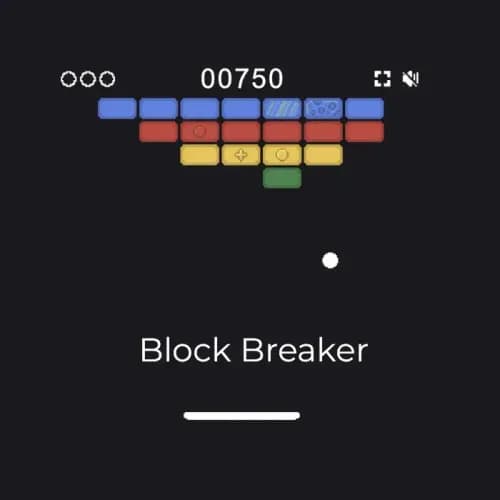

This page is for anyone who wants to play right now: people who went looking for Google's version and would rather not go through the search box, and people already mid-run who want to know what the marked bricks actually do.
Key Takeaways
- Free to play in your browser. No download, no login, no timer.
- It is not a Google Doodle. It's a Search easter egg, and that distinction is explained below.
- Keyboard or touch, but not the mouse: Up, W or Space launches the ball; Left/Right or A/D slide the paddle.
- Three balls per game, tracked by the three-dot counter in the top-left corner.
- The opening board is four rows of seven bricks. Some bricks carry a visible marker, and those are the ones that drop power-ups.
- Not the same game as Gameloft's Block Breaker Deluxe, and not Atari's original Breakout. See Which "Block Breaker" is this? below.
What Is Google Block Breaker?
Google Block Breaker is a paddle-and-ball arcade game where you bounce a ball into a wall of bricks until every breakable brick is gone. You control a paddle at the bottom of the screen, the ball ricochets off the walls and the bricks, and your only job is to keep it from falling past you. Clear the board to move on.
It belongs to the family Atari's Breakout started in 1976 (Wikipedia), and Google's version keeps that skeleton while adding things the 1976 machine never had: bricks that take more than one hit, bricks that drop power-ups, and a score that rewards you for keeping a rally alive. The first brick we cleared was worth 50 points.
What makes it distinctly Google's is the palette. The opening board is four rows in blue, red, yellow, and green, the same colors as the company's logo.
Is Google Block Breaker a Google Doodle?
No. It is an easter egg in Google Search, not a Doodle, and the two are different things. A Doodle is the illustrated artwork that replaces the Google logo on the homepage for a day. An easter egg is a hidden feature that appears in the search results when you look up a particular phrase.
Google Block Breaker is the second kind. Android Central reported it on January 30, 2025, describing it as "a new easter egg on Search," spotted first by Android Police: you search for "Block Breaker" and a play button appears in the results, alongside Google's other built-in games like Snake, PAC-MAN, Minesweeper, and Tic-Tac-Toe.
This matters because a large share of the pages ranking for this game call it a Doodle, and several build whole articles on that premise. If you came here trying to find it in a list of Doodle games, that's why you couldn't.
This site is not affiliated with, endorsed by, or operated by Google. "Google Block Breaker" is used here to name the game people are searching for. Google and the Google logo are trademarks of Google LLC.
How to Play Google Block Breaker
Keyboard on desktop, touch on a phone or tablet. What the game does not read is the mouse: move the cursor wherever you like and the paddle stays put.
| Action | Keys |
|---|---|
| Launch the ball | Up arrow, W, or Spacebar |
| Move the paddle left | Left arrow or A (hold it) |
| Move the paddle right | Right arrow or D (hold it) |
| Full screen | F, or the resize icon top right |
| Mute the sound | M, or the speaker icon top right |
| Exit full screen | Esc |
The on-screen hint at the start of a round shows only the arrow keys, so the WASD, Spacebar, F and M bindings are easy to miss. All of them are real.
- Press Up, W or Space to serve. The ball rests on your paddle and won't move until you launch it.
- Hold the movement keys, don't tap them. The paddle slides while a key is held down. Single taps barely shift it.
- Aim with the paddle, not with the ball. Where the ball strikes your paddle decides the angle it leaves at. Edges send it out at sharper angles; the center sends it back steeper.
- Watch the marked bricks. Bricks carrying a symbol behave differently from plain ones. They're the ones worth planning a shot around.
- Keep your last ball alive. You get three per game. The three-dot counter in the top-left ticks down each time one gets past you.
What's on the Board
The opening board is four rows of seven bricks: blue on top, then red, yellow, and green at the bottom. Most are plain. A handful carry a printed symbol, and those are the ones that release a power-up when you break them.
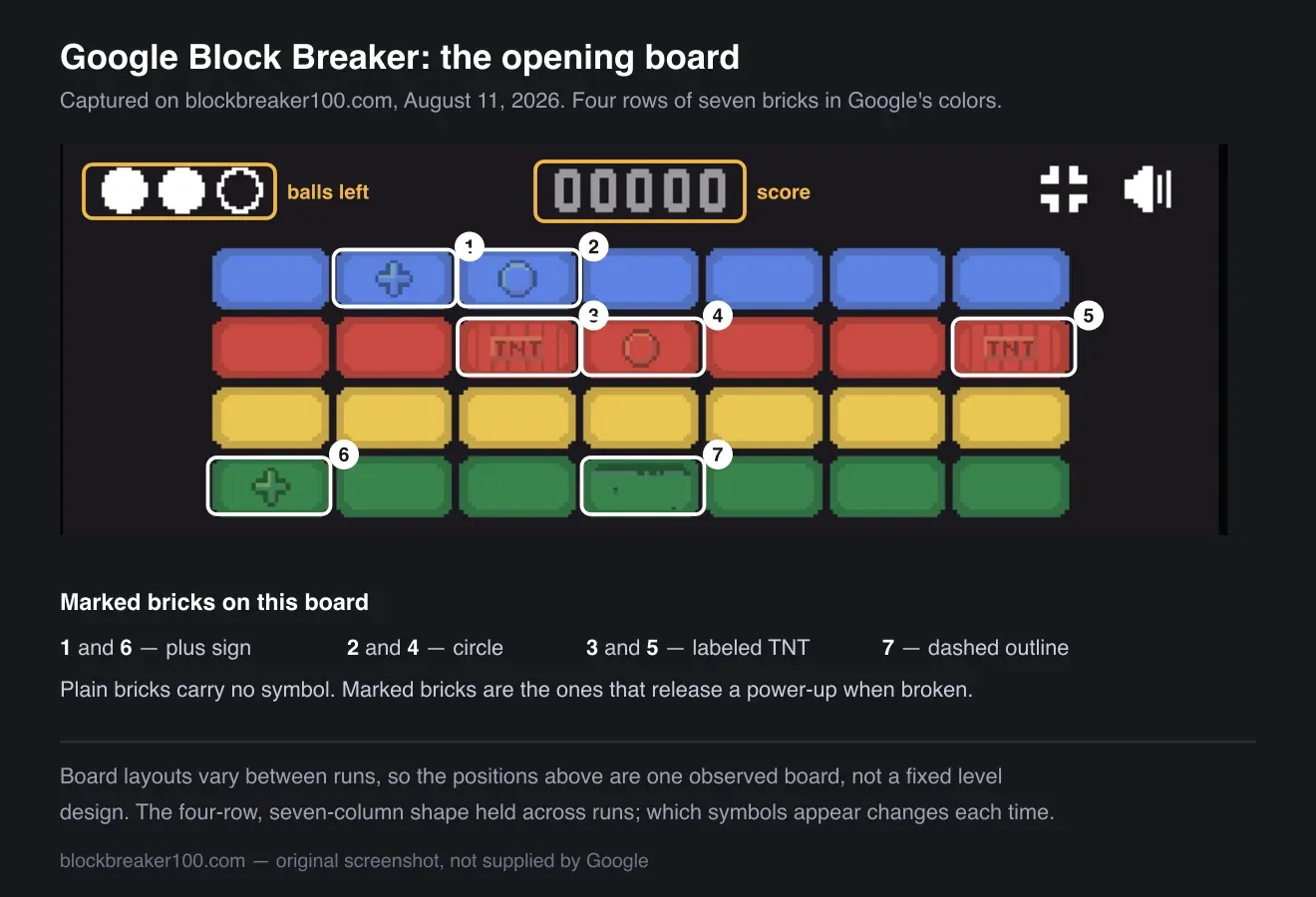
The opening board on one run, with every marked brick circled. Board layouts change between runs, so treat the positions as an example rather than a fixed level.
On the board above, two bricks in the red row have TNT printed right on them, which is about as clear a signal as a game can give you. Others carry a plus sign, a circle, or a dashed outline instead of a solid fill.
Three of the power-ups are described by effect in Android Central's report: a bubble that slows the ball as it falls back toward you, a pair of blasters that attach to either end of the paddle and fire upward, and a safety net that catches a ball you would otherwise lose.
The game holds more than those three. Its program files name nine separate effects: a laser (paddle-mounted guns), a fireball (a ball that powers through bricks), levitation and targeting aids, and a shield that rises and lowers across the bottom of the screen. Then there is a paddle that stretches, a paddle that shrinks, multiball (your one ball becomes several at once), and a heart that returns a lost ball.
The same files name six distinct brick types: TNT that explodes, a ghost brick that appears partway through a board, a two-hit brick that cracks before it breaks, mirror bricks, an acid brick, and a mushroom brick.
Treat that second list as an inventory rather than a set of instructions. It tells you what the game contains, which is more than any guide currently in the search results can show you, but it does not tell you exactly how each one behaves once it drops. One thing it does settle: the common claim that every power-up in this game helps you does not survive a build that ships a "paddle shrinks" effect.
Why this page has no level count and no points table
Because we can't verify either one. Search results for this game are full of confident specifics — a fixed number of levels, a points-per-color table, world-record scores — and the ones we could check did not match the game running on this page. One widely copied table lists an orange row worth 40 points; there is no orange row on this board at all. The only score we can vouch for is the one we watched happen: the first brick we broke was worth 50 points.
So those numbers are missing here on purpose. When we can measure them, we'll add them.
How we checked: the board layout, the ball count, and the score figure were tested against the game embedded above on August 11, 2026, and the launch keys were confirmed by pressing them. The full key map, the touch support, and the lists of power-ups and brick types come from the game's own program files, read the same day.
Tips for a Higher Score
- Open by carving a channel up one side. Get the ball above the brick wall and it will bounce along the top, clearing rows without ever coming back down to you.
- Use the paddle edges deliberately. A flat center hit sends the ball on a predictable vertical path. Corner shots are how you reach bricks stranded at the far edges.
- Don't chase every power-up. Catching one means moving the paddle away from where the ball is heading. If a drop pulls you out of position on your last ball, let it go.
- Expect the ball to speed up. Rallies get faster as the board thins out. Recenter your paddle between hits so you have room to react in either direction.
Which "Block Breaker" Is This?
Several unrelated games share this name, which is why searching for it turns up such different results.
- Google Block Breaker (this page) — the Search easter egg Google added in January 2025. Four rows of Google-colored bricks, keyboard or touch controls, power-ups. This is the game embedded above.
- Breakout (Atari, 1976) — the original. Designed by Nolan Bushnell and Steve Bristow and prototyped by Steve Wozniak with help from Steve Jobs, it put eight rows of bricks on screen and had no power-ups at all. Every game on this list descends from it.
- Block Breaker Deluxe (Gameloft) — a mobile series developed by Gameloft Romania for phones, later ported to iPod, Windows, N-Gage, Nintendo DS, and WiiWare. Gameloft has claimed over 8 million copies sold. Different game, different developer, and the source of searches for "Block Breaker Deluxe 2" and "Block Breaker 3 Unlimited."
- Brick Breaker (BlackBerry) — the version preloaded on BlackBerry handsets, which is what a lot of people actually remember when they picture this genre.
If you were looking for one of the last three specifically, this isn't it. Everything on this page describes Google's version.
Google Block Breaker vs. Atari's Breakout
| Google Block Breaker | Breakout (1976) | |
|---|---|---|
| Brick rows at start | 4 | 8 |
| Colors | Blue, red, yellow, green | Monochrome display under a colored overlay |
| Power-ups | Yes, dropped by marked bricks | None |
| Multi-hit bricks | Yes | No |
| Controls | Arrow keys or WASD, plus touch | Rotary knob |
| Where you play it | Google Search, or a browser page like this one | Arcade cabinet |
Breakout figures: Breakout (video game), Wikipedia, retrieved August 11, 2026. Google Block Breaker figures measured on this page the same day.
Play Google Block Breaker Now
Scroll back up and press Up to serve. It's free, it runs in the browser, and there's nothing to install. If you want something else after a few rounds, the free games collection has the rest of what's playable here.